

EasyGO fare card
The EasyGO fare card is a smart card that can be loaded with passes, stored value or both. Each card can hold up two passes and $250 in stored value.
- When you pay with stored value, your fare is deducted from your balance when you tap.
- When you pay with a pass, you can tap your card unlimited times for as long as the pass is valid.
Get and load your card Register your card Pay your fare Check your balance and history Lost cards
Get and load your card
Get a new EasyGO fare card:
- By filling out the online form
- From a fare vending machine
- In person from a GRT customer service location or retailer
- Online using the MyEasyGO website. Learn how to load your card online
- At a fare vending machine
- At a GRT customer service location or retailer
If you load your card in person, you can use the fare products on your card right away. If you load online, it will take 24-48 hours for your fare products to be activated.
Register your card
Registering your card protects your balance if your card is lost or stolen. Your card can be deactivated and your fare products transferred to a new card. Unregistered cards cannot be blocked or replaced, and the pass or stored value on the card can be used.
If your card is registered, you can also run a negative balance for one trip. If you have at least 1¢ in stored value, you can ride GRT, and the fare will be deducted next time you load your card.
How to register your card
You can register your card:
- Online using the My EasyGO website. Click the "Create an account" button. If you have just picked up your card, it can take up to 48 hours until you see the option to create an account.
- In person at a GRT customer service location
Registration and personal information
When you register your card, you’ll be asked for your name, address and contact information. See the EasyGO fare card privacy policy for details on how your personal information is used, stored and shared.
Information about where the card has been tapped (boarding data) is associated with the card's serial number. When you register your card, this boarding data is associated with your personal information. This is used to provide you with your transaction history.
GRT does not use, report or publish personal information linked to boarding data, except to provide you with your transaction history as specified above. Boarding data will only be made available in an anonymized and aggregate form (amassed data stripped of personal information) for study by GRT and the Region of Waterloo to better understand, plan and forecast ridership volumes and transit service.
Pay your fare
If you have a pass on your card, it will be used first. If you don't have a pass, you can pay with stored value.
When you pay with stored value, a transfer is added to your card when you tap. The transfer is good for unlimited trips on buses or trains for 120 minutes.
Paying on the bus
There are two types of fareboxes on GRT buses. Hold your EasyGO card against the smart card reader and wait for the farebox to ding.
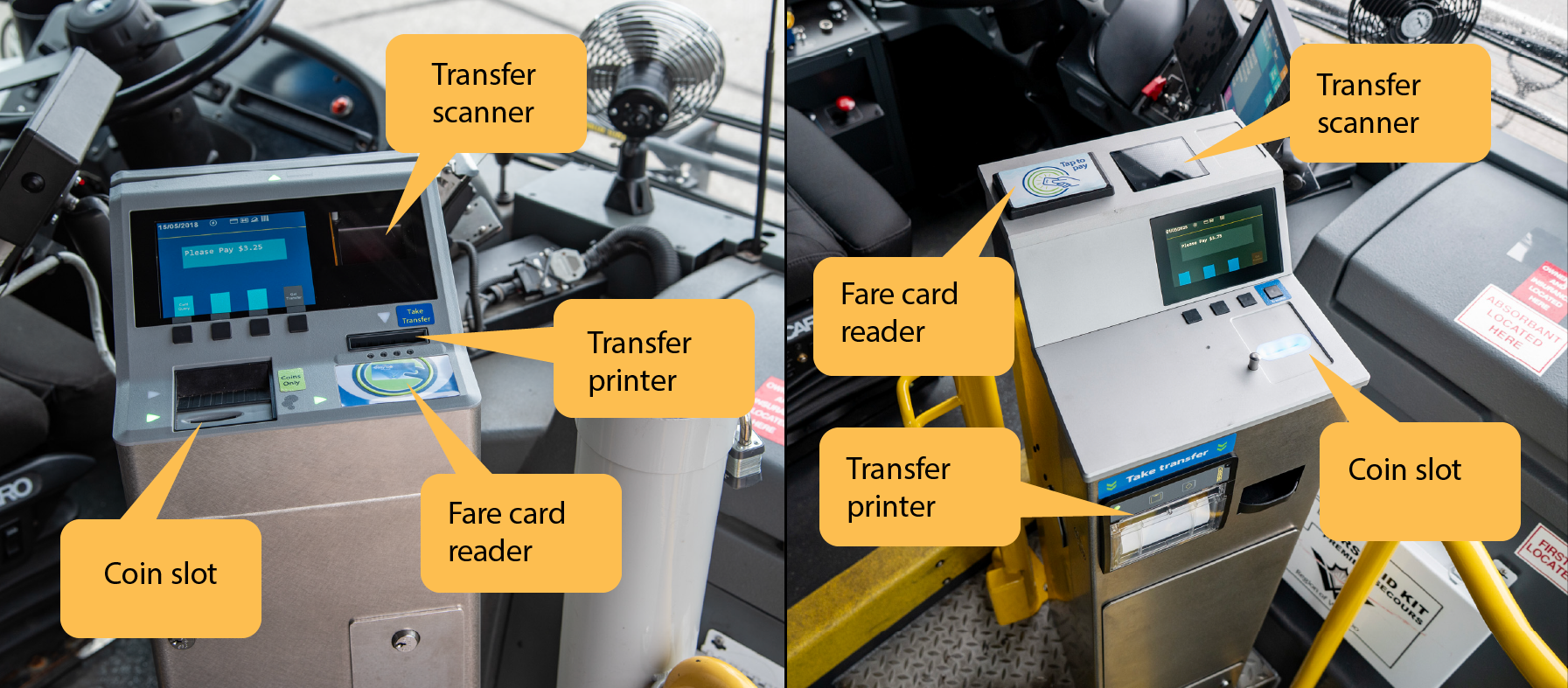
If you have stored value and no passes on your card, you can pay for a group of 2-15 people. Let the operator know how many people you are paying for. Wait for them to enter the number, then tap your card on the smart card reader. All the transfers for the group will be loaded on your card, so the group must be travelling together to your final destination.
Paying on the train
To pay at an ION station, tap your card on the platform card reader before boarding. You can also pay your fare at the fare vending machine.
Fare inspectors may ask to see your card to check your proof of payment.
If you have stored value and no passes on your card, you can pay for a group of 2-15 people at the fare vending machine. Press "I have an EasyGO fare card", then select "Buy group fare". Press the button for the number of people you are paying for.
Paying on Kiwanis Transit
Kiwanis Transit customers: EasyGO fare cards cannot be used on Kiwanis Transit vehicles. To pay your fare on Kiwanis Transit, you can purchase paper tickets and passes.
Paying on Routes 76, 77, 78
Show your fare card to the driver when boarding.
Check your balance and history
If you're paying with stored value, your balance is displayed every time you tap your card on a farebox or platform card reader.
You can check your balance and transaction history:
- Online using the My EasyGO website
- At a fare vending machine
- in person at a GRT customer service location
If your card is registered, you can see your previous 100 transactions. If your card is not registered, you can see your previous 10 transactions.
Lost cards
It may take up to 48 hours after you report a lost card for your card to be blocked. GRT is not responsible for any use of your card or fare products before the block takes effect.
You can report a lost card:
- Online by logging into your My EasyGO account and blocking your card.
- By filling out the GRT customer feedback form
- In person at a GRT customer service location during business hours. You will need to provide your name and verify your identity.
- By phone by calling GRT customer service at 519-585-7555. You will need to provide your name and verify your identity. Your card will be blocked within two business days.
Replacing your card
Once your card has been blocked, it cannot be used again. You will have to get a replacement card from customer service; customer service agents will transfer any passes and stored value to your new card. Let the agent know if your card was enrolled in Connect-to-GO, so it can be re-added.
Replacement cards will be subject to a new card issuing fee. You will need to provide proof of identification in order to transfer your balance. Note that any balance must be transferred to a new card at customer service; it cannot be transferred to another card you own.